Hi everyone 
Problem to solve
My code coverage statistics are not showing / are not detected as you can see on the next image:

The badge isn’t working as well:

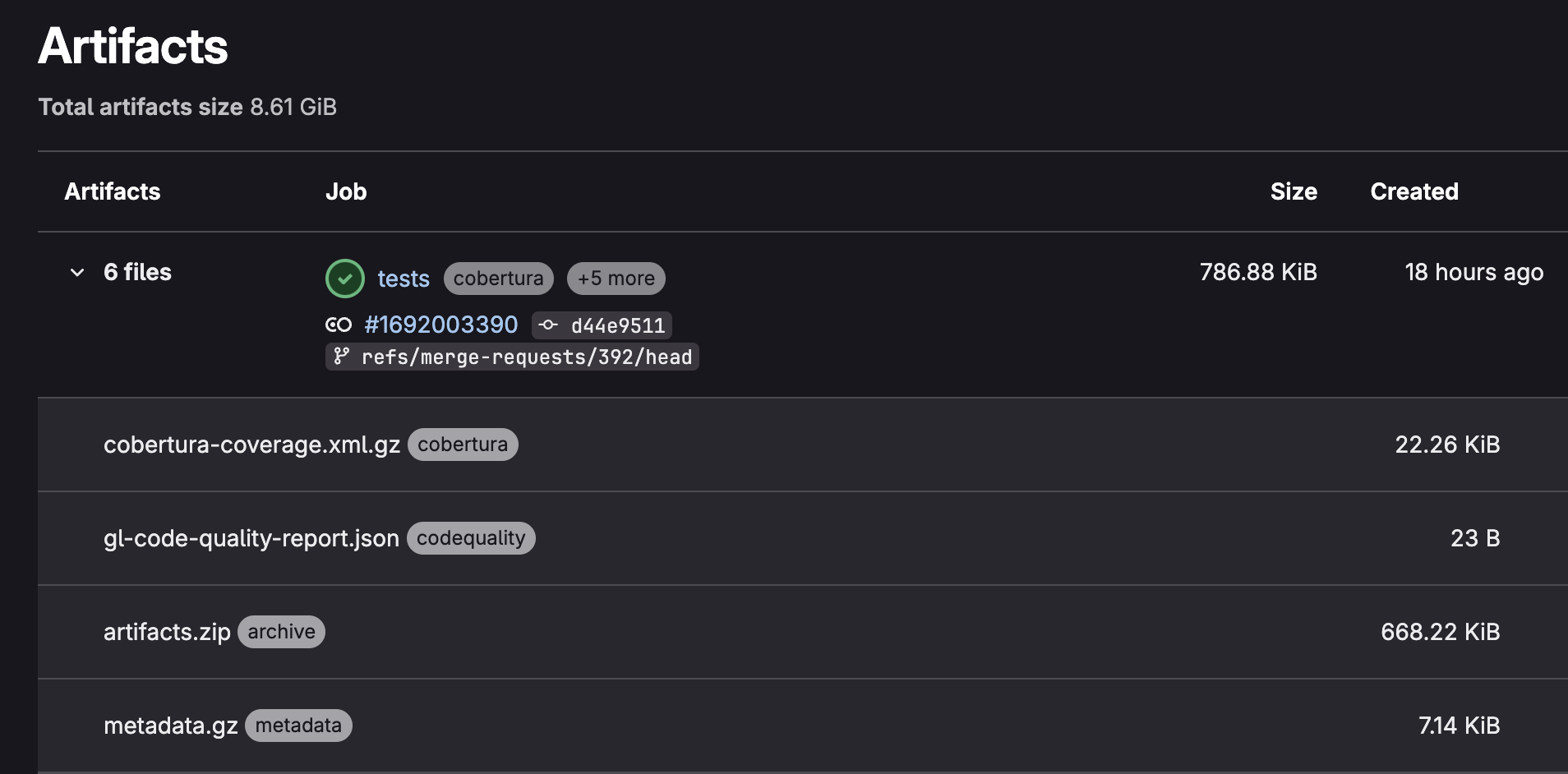
Even tho the necessary coverage (and reports) files, are correctly uploaded on my Artifacts:
My report is appearing correctly on my merge request. I can even click the ‘Full report’ button to see it in details and it works perfectly fine.

Steps to reproduce
Here is a list all the similar topics I have found on forums but did not resolved my problematic:
- Wrong coverage regex:
- Haven’t merged the MR I guess ?
- Same problematic as me I think but different configuration (no answers):
Also, in the Gitlab documentation at: Use CI/CD to build your application → Testing → Code coverage → Corbetura coverage report
We can read the next lines under the title:
Uploading a test coverage report does not enable:
- Test coverage results in the merge request widget.
- Code coverage history.
You must configure these separately.
Fine. It’s pretty clear but the links are not explaining anything about the configuration to put in place. It’s only explaining how to use the graph (when it’s actually working).
Configuration
.gitlab-ci.yml file (only with the tests job)
Here my coverage regex is different from the one in the documentation since the one from the documentation is giving me a 201% coverage result (I’m not the type to do tests of my tests, so I’m pretty sure it’s incorrect or I misunderstood something haha).

tests:
    stage: testing
    rules:
        - if: $CI_MERGE_REQUEST_TARGET_BRANCH_NAME == "staging"
          when: always
        - if: $CI_MERGE_REQUEST_TARGET_BRANCH_NAME == "master"
          when: always
        - if: $CI_COMMIT_TAG =~ /^release-([0-9.]+)/
          when: always
        - if: $CI_PIPELINE_SOURCE == "web"
          when: manual
    script:
        - docker-compose -f docker-compose.test.yml up --build --abort-on-container-exit --exit-code-from projects
    coverage: '/All files[^|]*\|[^|]*\|[^|]*\|[^|]*\|[\d\.]*\s*\d*/'
    artifacts:
        when: always
        reports:
            junit: reports/jest-junit.xml
            coverage_report:
                coverage_format: cobertura
                path: coverage/cobertura-coverage.xml
            codequality: reports/codequality/gl-code-quality-report.json
        paths:
            - coverage/
            - reports/
docker-compose.test.yml
version: '3.7'

services:
    projects:
        stdin_open: true
        build:
            context: .
            target: test
            args:
                - NPM_TOKEN=${NPM_TOKEN}
                - CI_JOB_TOKEN=${CI_JOB_TOKEN}
        container_name: project
        environment:
            ...
        volumes:
            - ./src:/app/src
            - ./tests:/app/tests
            - ./coverage:/app/coverage
            - ./reports:/app/reports
            - ./.eslintrc.json:/app/.eslintrc.json
            - ./.eslintignore:/app/.eslintignore
            - ./.prettierrc:/app/.prettierrc
            - ./.prettierignore:/app/.prettierignore

    db:
        ...
package.json (test script triggered by my Dockerfile)
{
    "name": "project",
    "version": "1.0.0",
    "description": "",
    "main": "index.ts",
    "scripts": {
        "test": "jest --coverage --runInBand --detectOpenHandles",
        "lint:gitlab": "npx eslint . --ext .ts --format gitlab -o /app/reports/codequality/gl-code-quality-report.json",
    },
    "dependencies": {
        ...
    }
    "devDependencies": {
        "jest": "29.7.0",
        "jest-junit": "16.0.0",
        ...
    }
}
jest.config.ts
export default {
    preset: 'ts-jest',
    testEnvironment: 'node',
    moduleNameMapper: {
        '@exmpl/(.*)': '<rootDir>/src/$1',
    },
    collectCoverage: true,
    coverageDirectory: 'coverage',
    coverageReporters: ['text', 'lcov', 'cobertura'],
    collectCoverageFrom: [
        'src/**/*.{js,ts}',
        '!src/**/*.d.ts',
        '!src/**/index.{js,ts}',
        '!src/**/main.{js,ts}',
        '!src/**/*.interface.{js,ts}',
        ...
    ],
    coverageThreshold: {
        global: {
            branches: 40,
            functions: 40,
            lines: 40,
            statements: 40,
        },
    },
    reporters: [
        'default',
        [
            'jest-junit',
            {
                outputDirectory: 'reports',
                outputName: 'jest-junit.xml',
                ancestorSeparator: ' › ',
                uniqueOutputName: 'false',
                suiteNameTemplate: '{filepath}',
                classNameTemplate: '{classname}',
                titleTemplate: '{title}',
            },
        ],
    ],
};
Versions
Versions
- GitLab: GitLab Enterprise Edition 17.10.0-pre
- GitLab Runner: I don’t have access to this info but I’m sure one of the latest version. I could have if needed.
Anyone’s help is welcome! I have no more other ideas where to look for. I’ll keep this topic updated if I find any solution.
Thanks.