Cannot effectively query the api for dependency version because multiple versions come back
Context: My aim is to write a script to dismiss known false positive secret detection vulnerabilities across our repos, detected in part based on the vulnerable package's version.
The secret detection scanner is picking up commented out lines like this in third party packages, and flagging our apps as containing secrets.
* // given URL http://user:password\@example.com:8080/#/some/path?foo=bar&baz=xoxo
As a junior dev, I’ve been tasked with writing queries against the gitlab api to aggregate these supposed violations across our codebase by: {Vulnerability identifier, status, affected package, version, specific filepath, violation line number}, and then batch dismiss them when they match a list of human-verified false positives. So for instance, any time it detects a vulnerability that matches
{
  identifier: "Gitleaks rule ID Password in URL",
  status: ['CONFIRMED', 'DETECTED'],
  package: "@angular/common",
  version: "9.1.13",
  file: "node_modules/@angular/common/fesm2015/upgrade.js",
  line: 636
}
we know we can dismiss it because we’ve added that specific vulnerability to a list of known false positives.
The issue at present has been in getting the query to return the correct dependency version. There doesn’t seem to be a way to identify the specific version from the vulnerability itself, so we’re running something like
    query getDependencyVersion(
        $vulnerabilityId: VulnerabilityID!
        $componentNames: [String!]
    ) {
        vulnerability(id: $vulnerabilityId) {
            project {
                dependencies(componentNames: $componentNames) {
                    nodes {
                        version
                    }
                }
            }
        }
    }
I’m not super happy with this query since the version and the vulnerability are a little too detached for my liking, but it’s the best I can figure. We’re trying to confine our vulnerability ids to only those that appear on the default branch (not sure if that’s even necessary), which I believe should coincide with the version returned by the dependency list. For the most part this is true.
However, in very few projects, there are multiple dependency versions for the same package:
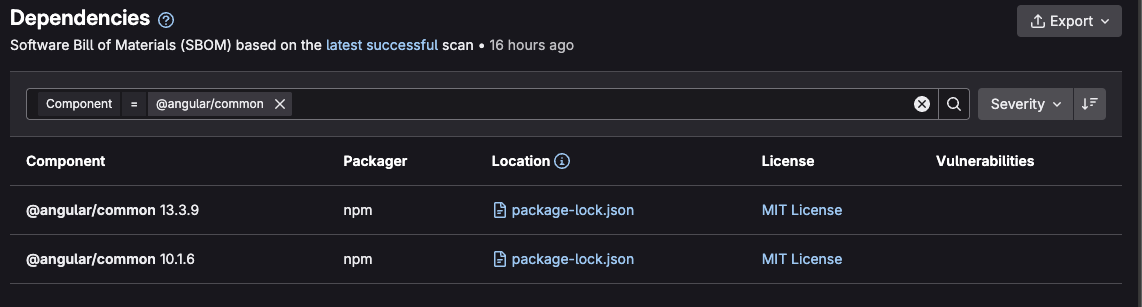
Same info from the api:
    {
      "name": "@angular/common",
      "packager": "npm",
      "version": "13.3.9",
      "location": {
        "blob_path": "/...82fcf8/package-lock.json",
        "path": "package-lock.json",
        "top_level": false,
        "ancestors": []
      },
      "vulnerabilities": [],
      "licenses": [
        {
          "spdx_identifier": "MIT",
          "name": "MIT License",
          "url": "https://spdx.org/licenses/MIT.html"
        }
      ],
      "occurrence_id": 123456,
      "vulnerability_count": 0
    },
    {
      "name": "@angular/common",
      "packager": "npm",
      "version": "10.1.6",
      "location": {
        "blob_path": "/...161766/package-lock.json",
        "path": "package-lock.json",
        "top_level": false,
        "ancestors": []
      },
      "vulnerabilities": [],
      "licenses": [
        {
          "spdx_identifier": "MIT",
          "name": "MIT License",
          "url": "https://spdx.org/licenses/MIT.html"
        }
      ],
      "occurrence_id": 789012,
      "vulnerability_count": 0
    },
Attempted solutions
This particular case is one where at one point the project downgraded from v13 to v10, so I thought that clearing the runner cache might clear up the v13 data, but it did not. And most other projects that return multiple versions (less friendly to display for uninteresting reasons) are cases where there has been no downgrade of the package that I can tell.
Returning the package.json and package-lock.json files, as well as looking through the build artifacts of the latest successful scan, it seems that the v13 package info does not appear anywhere in the build.
"@angular/common": {
      "version": "10.1.6",
      "resolved": "https://registry.npmjs.org/@angular/common/-/common-10.1.6.tgz",
      "integrity": "sha512-4ywlUHHF5ofZRTHJ/jQTHoO8Tu05Wvn+3N7swaJ9yAfiywbSE4Bop6FYsocxaxROrGS0k6Unvgj8+J7x6AeqlA==",
      "requires": {
        "tslib": "^2.0.0"
      }
    },
There are a few stale branches that still contain v13, but they are quite old (>2y). There are more recent branches where people have experimentally upgraded to v17, but that isn’t in the dependency list. So I somewhat suspect that the dependency list only correlates to the default branch, but that would make it even more odd that it displays multiple results.
I considered maybe the dependency list tracked dependency versions for the default branch plus releases, but these repos have no releases as far as gitlab is concerned.
My main theory is that the dependency list tracks all historical versions from the default branch, but then in that case I’m not sure how to clear it if clearing the runner cache isn’t effective.
As it stands, this issue is causing a lot of complexity for my query. The theoretical worst case, although admittedly extremely unlikely, would be that it results in dismissing a true positive secret detection vulnerability based on its detecting a false positive on the same line in a different version of the file, e.g.
v 1.0 line 17
17 // don't log your passwords in comments like this: https://username:password\@example.com
v 1.1 line 17
17 // don't log your passwords in comments like I'm doing now: https://myrealusername:myrealpassword\@mydomain.com
Steps to reproduce
Unknown. I am inheriting these projects and their complexities, and have not yet identified the common thread between those that have multiple dependency versions.
Versions
GitLab Enterprise Edition 17.11.0-pre 10162ac0fc8