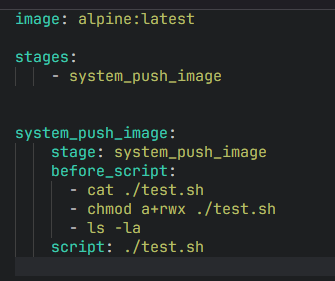
Problem to solve
How should I run .sh files? I look up a lot of information that is supported, but I really don’t have it, the path is correct,
Steps to reproduce
Which troubleshooting steps have you already taken? Can you link to any docs or other resources so we know where you have been?
Configuration
Versions
Are you sure your shell interpreter is found if you’re running on alpine? I’m doing AWS stuff, so I’m using:
registry.gitlab.com/gitlab-org/cloud-deploy/aws-base:latest
then my pipeline looks like:
do_the_thing:
  stage: do_the_thing
  script:
    - bash ./do_the_thing.sh
chmod a+rwx makes the file world writable and executable, and can become a security problem. Suggest changing that to chmod +x ... in case the flag is not persisted in the Git repository.
The error message reads like the script is trying to execute itself again in line 159. Can you show the content of the script itself?
I mean I can’t be sure, but given the script is 221 bytes, it’s unlikely to have 159 lines. 
It could download another script using curl, and run eval/execute. I’d like to see the content to verify my assumptions 
If you are defining these jobs in a different repo and then including them, you won’t have the right scope. If that is the case, to fix it you would need to curl the repo and get the file that way within the job
I have a very similar setup but I here-document the script into the file, so I know it’s there. (don’t ask).
I got round this specific issue by prefixing my call to the script with bash .
I don’t know why it’s required. I don’t think it should be.
Maybe the chmod doesn’t work correctly for some reason, or maybe there is a scoping issue.