Problem to solve
I have a fresh new ubuntu 24.04 VM, just did apt update and upgrade then followed instructions at
https://about.gitlab.com/install/#ubuntu
and issuing
sudo EXTERNAL_URL="https://gitlab.example.com" apt-get install gitlab-ee
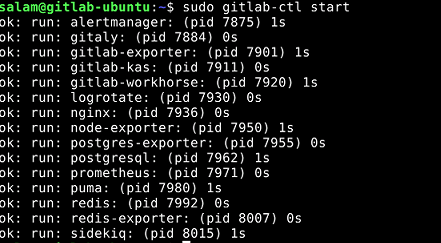
setup goes through as you can notice in the snapshot
running
sudo gitlab-ctl status
shows
run: alertmanager: (pid 18766) 528s; run: log: (pid 18647) 570s
run: gitaly: (pid 18726) 532s; run: log: (pid 18136) 763s
run: gitlab-exporter: (pid 18741) 530s; run: log: (pid 18583) 590s
run: gitlab-kas: (pid 18355) 733s; run: log: (pid 18366) 730s
run: gitlab-workhorse: (pid 18711) 532s; run: log: (pid 18477) 606s
run: logrotate: (pid 18059) 777s; run: log: (pid 18067) 776s
run: nginx: (pid 18721) 532s; run: log: (pid 18522) 602s
run: node-exporter: (pid 18735) 531s; run: log: (pid 18560) 596s
run: postgres-exporter: (pid 18774) 527s; run: log: (pid 18661) 566s
run: postgresql: (pid 18186) 744s; run: log: (pid 18204) 741s
run: prometheus: (pid 18751) 529s; run: log: (pid 18628) 577s
run: puma: (pid 19318) 21s; run: log: (pid 18429) 620s
run: redis: (pid 18094) 771s; run: log: (pid 18110) 768s
run: redis-exporter: (pid 18743) 530s; run: log: (pid 18604) 584s
run: sidekiq: (pid 18439) 615s; run: log: (pid 18459) 613s
but when I browse to the url I get
so am I missing something? of course I can ping the domain I used in the setup. Firewall is inactive.
grove
December 10, 2024, 9:54am
2
It’s normal for GitLab to take some time (but it’s normally on the order of a few seconds) to start responding properly after starting it. So the obvious question is: You’re not just quick and impatient?
You need to look in the logs to see what is wrong.
I am waiting since 2 days How should I search and which logs please?
grove
December 10, 2024, 11:36am
4
I didn’t say which log because it can be several (I believe I’ve had similar problems that were reported in different logs). If you haven’t done anything to move them, the packages usually put them in in /var/log/gitlab.
grove:
/var/log/gitlab
Ok, I searched /var/log/gitlab/nginx/gitlab_access.log it seems nothing is there except the 502 message
192.168.1.29 - - [10/Dec/2024:12:26:30 +0000] “GET /favicon.ico HTTP/1.1” 502 2026 “http://192.168.1.29/ ” "Mozilla/5.0 (X11; Ubuntu; Linux x86_64; rv:133.0)>
192.168.1.29 - - [10/Dec/2024:12:26:35 +0000] “GET / HTTP/1.1” 502 2026 “” “Mozilla/5.0 (X11; Ubuntu; Linux x86_64; rv:133.0) Gecko/20100101 Firefox/133.0” -
192.168.1.29 - - [10/Dec/2024:12:26:40 +0000] “GET / HTTP/1.1” 502 2026 “” “Mozilla/5.0 (X11; Ubuntu; Linux x86_64; rv:133.0) Gecko/20100101 Firefox/133.0” -
192.168.1.3 - - [10/Dec/2024:12:26:42 +0000] “POST /api/v4/jobs/request HTTP/1.1” 502 35 “” “gitlab-runner 15.0.0 (15-0-stable; go1.17.7; windows/amd64)” -
192.168.1.29 - - [10/Dec/2024:12:26:45 +0000] “GET / HTTP/1.1” 502 2026 “” “Mozilla/5.0 (X11; Ubuntu; Linux x86_64; rv:133.0) Gecko/20100101 Firefox/133.0” -
192.168.1.29 - - [10/Dec/2024:12:26:50 +0000] “GET / HTTP/1.1” 502 2026 “” “Mozilla/5.0 (X11; Ubuntu; Linux x86_64; rv:133.0) Gecko/20100101 Firefox/133.0” -
192.168.1.29 - - [10/Dec/2024:12:26:56 +0000] “GET / HTTP/1.1” 502 2026 “” “Mozilla/5.0 (X11; Ubuntu; Linux x86_64; rv:133.0) Gecko/20100101 Firefox/133.0” -
192.168.1.29 - - [10/Dec/2024:12:27:01 +0000] “GET / HTTP/1.1” 502 2026 “” “Mozilla/5.0 (X11; Ubuntu; Linux x86_64; rv:133.0) Gecko/20100101 Firefox/133.0” -
192.168.1.29 - - [10/Dec/2024:12:27:06 +0000] “GET / HTTP/1.1” 502 2026 “” “Mozilla/5.0 (X11; Ubuntu; Linux x86_64; rv:133.0) Gecko/20100101 Firefox/133.0” -
192.168.1.29 - - [10/Dec/2024:12:27:11 +0000] “GET / HTTP/1.1” 502 2026 “” “Mozilla/5.0 (X11; Ubuntu; Linux x86_64; rv:133.0) Gecko/20100101 Firefox/133.0” -
192.168.1.29 - - [10/Dec/2024:12:27:16 +0000] “GET / HTTP/1.1” 502 2026 “” “Mozilla/5.0 (X11; Ubuntu; Linux x86_64; rv:133.0) Gecko/20100101 Firefox/133.0” -
192.168.1.29 - - [10/Dec/2024:12:27:21 +0000] “GET / HTTP/1.1” 502 2026 “” “Mozilla/5.0 (X11; Ubuntu; Linux x86_64; rv:133.0) Gecko/20100101 Firefox/133.0” -
192.168.1.29 - - [10/Dec/2024:12:27:27 +0000] “GET / HTTP/1.1” 502 2026 “” “Mozilla/5.0 (X11; Ubuntu; Linux x86_64; rv:133.0) Gecko/20100101 Firefox/133.0” -
192.168.1.29 - - [10/Dec/2024:12:27:32 +0000] “GET / HTTP/1.1” 502 2026 “” “Mozilla/5.0 (X11; Ubuntu; Linux x86_64; rv:133.0) Gecko/20100101 Firefox/133.0” -
192.168.1.29 - - [10/Dec/2024:12:27:37 +0000] “GET / HTTP/1.1” 502 2026 “” “Mozilla/5.0 (X11; Ubuntu; Linux x86_64; rv:133.0) Gecko/20100101 Firefox/133.0” -
192.168.1.3 - - [10/Dec/2024:12:27:42 +0000] “POST /api/v4/jobs/request HTTP/1.1” 502 35 “” “gitlab-runner 15.0.0 (15-0-stable; go1.17.7; windows/amd64)” -
192.168.1.29 - - [10/Dec/2024:12:27:42 +0000] “GET / HTTP/1.1” 502 2026 “” “Mozilla/5.0 (X11; Ubuntu; Linux x86_64; rv:133.0) Gecko/20100101 Firefox/133.0” -
192.168.1.29 - - [10/Dec/2024:12:27:47 +0000] “GET / HTTP/1.1” 502 2026 “” “Mozilla/5.0 (X11; Ubuntu; Linux x86_64; rv:133.0) Gecko/20100101 Firefox/133.0” -
192.168.1.29 - - [10/Dec/2024:12:27:52 +0000] “GET / HTTP/1.1” 502 2026 “” “Mozilla/5.0 (X11; Ubuntu; Linux x86_64; rv:133.0) Gecko/20100101 Firefox/133.0” -
192.168.1.29 - - [10/Dec/2024:12:27:57 +0000] “GET / HTTP/1.1” 502 2026 “” “Mozilla/5.0 (X11; Ubuntu; Linux x86_64; rv:133.0) Gecko/20100101 Firefox/133.0” -
192.168.1.29 - - [10/Dec/2024:12:28:03 +0000] “GET / HTTP/1.1” 502 2026 “” “Mozilla/5.0 (X11; Ubuntu; Linux x86_64; rv:133.0) Gecko/20100101 Firefox/133.0” -
192.168.1.29 - - [10/Dec/2024:12:28:08 +0000] “GET / HTTP/1.1” 502 2026 “” “Mozilla/5.0 (X11; Ubuntu; Linux x86_64; rv:133.0) Gecko/20100101 Firefox/133.0” -
192.168.1.29 - - [10/Dec/2024:12:28:13 +0000] “GET / HTTP/1.1” 502 2026 “” “Mozilla/5.0 (X11; Ubuntu; Linux x86_64; rv:133.0) Gecko/20100101 Firefox/133.0” -
192.168.1.29 - - [10/Dec/2024:12:28:18 +0000] “GET / HTTP/1.1” 502 2026 “” “Mozilla/5.0 (X11; Ubuntu; Linux x86_64; rv:133.0) Gecko/20100101 Firefox/133.0” -
192.168.1.29 - - [10/Dec/2024:12:28:23 +0000] “GET / HTTP/1.1” 502 2026 “” “Mozilla/5.0 (X11; Ubuntu; Linux x86_64; rv:133.0) Gecko/20100101 Firefox/133.0” -
192.168.1.29 - - [10/Dec/2024:12:28:28 +0000] “GET /api/v4/internal/kubernetes/receptive_agents HTTP/1.1” 502 35 “” “gitlab-kas/v17.6.1/v17.6.1” -
192.168.1.29 - - [10/Dec/2024:12:28:28 +0000] “GET / HTTP/1.1” 502 2026 “” “Mozilla/5.0 (X11; Ubuntu; Linux x86_64; rv:133.0) Gecko/20100101 Firefox/133.0” -
192.168.1.29 - - [10/Dec/2024:12:28:28 +0000] “GET /api/v4/internal/kubernetes/receptive_agents HTTP/1.1” 502 35 “” “gitlab-kas/v17.6.1/v17.6.1” -
192.168.1.29 - - [10/Dec/2024:12:28:29 +0000] “GET /api/v4/internal/kubernetes/receptive_agents HTTP/1.1” 502 35 “” “gitlab-kas/v17.6.1/v17.6.1” -
192.168.1.29 - - [10/Dec/2024:12:28:33 +0000] “GET / HTTP/1.1” 502 2026 “” “Mozilla/5.0 (X11; Ubuntu; Linux x86_64; rv:133.0) Gecko/20100101 Firefox/133.0” -
192.168.1.29 - - [10/Dec/2024:12:28:38 +0000] “GET / HTTP/1.1” 502 2026 “” “Mozilla/5.0 (X11; Ubuntu; Linux x86_64; rv:133.0) Gecko/20100101 Firefox/133.0” -
192.168.1.3 - - [10/Dec/2024:12:28:42 +0000] “POST /api/v4/jobs/request HTTP/1.1” 502 35 “” “gitlab-runner 15.0.0 (15-0-stable; go1.17.7; windows/amd64)” -
192.168.1.29 - - [10/Dec/2024:12:28:43 +0000] “GET / HTTP/1.1” 502 2026 “” “Mozilla/5.0 (X11; Ubuntu; Linux x86_64; rv:133.0) Gecko/20100101 Firefox/133.0” -
192.168.1.29 - - [10/Dec/2024:12:28:48 +0000] “GET / HTTP/1.1” 502 2026 “” “Mozilla/5.0 (X11; Ubuntu; Linux x86_64; rv:133.0) Gecko/20100101 Firefox/133.0” -
When I issue
sudo ls -l /var/log/gitlab
I get several folders, really not sure where and what to search for
I also ran
sudo gitlab-rake gitlab:check
Here is the output where I sees
Internal API available: FAILED - Internal API unreachable
Checking GitLab subtasks ...
Checking GitLab Shell ...
GitLab Shell: ... GitLab Shell version >= 14.39.0 ? ... OK (14.39.0)
Running /opt/gitlab/embedded/service/gitlab-shell/bin/gitlab-shell-check
Internal API available: FAILED - Internal API unreachable
gitlab-shell self-check failed
Try fixing it:
Make sure GitLab is running;
Check the gitlab-shell configuration file:
sudo -u git -H editor /opt/gitlab/embedded/service/gitlab-shell/config.yml
Please fix the error above and rerun the checks.
Checking GitLab Shell ... Finished
Checking Gitaly ...
Gitaly: ... default ... OK
Checking Gitaly ... Finished
Checking Sidekiq ...
Sidekiq: ... Running? ... yes
Number of Sidekiq processes (cluster/worker) ... 1/1
Checking Sidekiq ... Finished
Checking Incoming Email ...
Incoming Email: ... Reply by email is disabled in config/gitlab.yml
Checking Incoming Email ... Finished
Checking LDAP ...
LDAP: ... LDAP is disabled in config/gitlab.yml
Checking LDAP ... Finished
Checking GitLab App ...
Database config exists? ... yes
Tables are truncated? ... skipped
All migrations up? ... yes
Database contains orphaned GroupMembers? ... no
GitLab config exists? ... yes
GitLab config up to date? ... yes
Cable config exists? ... yes
Resque config exists? ... yes
Log directory writable? ... yes
Tmp directory writable? ... yes
Uploads directory exists? ... yes
Uploads directory has correct permissions? ... yes
Uploads directory tmp has correct permissions? ... skipped (no tmp uploads folder yet)
Systemd unit files or init script exist? ... skipped (omnibus-gitlab has neither init script nor systemd units)
Systemd unit files or init script up-to-date? ... skipped (omnibus-gitlab has neither init script nor systemd units)
Projects have namespace: ... can't check, you have no projects
Redis version >= 6.2.14? ... yes
Ruby version >= 3.0.6 ? ... yes (3.2.5)
Git user has default SSH configuration? ... yes
Active users: ... 1
Is authorized keys file accessible? ... yes
GitLab configured to store new projects in hashed storage? ... yes
All projects are in hashed storage? ... yes
Elasticsearch version 7.x-8.x or OpenSearch version 1.x ... skipped (Advanced Search is disabled)
All migrations must be finished before doing a major upgrade ... skipped (Advanced Search is disabled)
grove
December 10, 2024, 1:27pm
7
If /var/log/gitlab/nginx/gitlab_access.log doesn’t show anything (it seldom does), look at the other log files, there will typically be more, and one of them will probably give you a clue.
I searched almost all main logs, nothing is there
Hi can somebody please look into this and let me know gow to fix this issue, I should think that it should no s complicated for those who knows well gitlab. 3 years back, I had setup version 15.1 did not have any issueit was working like a charm
Is there somebody please who can look into this and tell me what is missing as all services are up and running.