Hi Team,
I am tried downloading a repository files using the GITLAB API but facing issue.
-
When I tried downloading the file which is present at root level of a project it get downloaded.
Here is the URL used: https://gitlab.com/api/v4/projects/123456/repository/files/.gitignore/raw?ref=main
-
When I tried downloading the file which is present at directory level of a project it is failing with 404 error.
Here is the URL used: https://gitlab.com/api/v4/projects/123456/repository/files/data%2Fdata.json/raw?ref=main
Yes I have create GITLAB TOKEN to access all these.
Can someone please help me here.
Can you share the command line with curl, or API library source code that show how the calls towards the API endpoints are made, and what detailed response they return?
Here is the curl command
curl --header "PRIVATE-TOKEN: ****" "https://gitlab.com/api/v4/projects/123456/repository/files/data%2Fdata.json/raw?ref=main"
Here is the code - Kotlin Spring
fun getGitLabFile(): ResponseEntity<String> {

        // Encode the file path
        val encodedFilePath = URLEncoder.encode("data/data.json", "UTF-8")

        // Construct the URL
        val url = "https://gitlab.com/api/v4/projects/123456/repository/files/$encodedFilePath/raw?ref=main"

        // Set up headers
        val headers = HttpHeaders()
        headers.set("PRIVATE-TOKEN", "****")

        // Create the request entity
        val requestEntity = HttpEntity<String>(headers)

        // Make the request
        return restTemplate.exchange(
            url,
            HttpMethod.GET,
            requestEntity,
            String::class.java
        )
    }
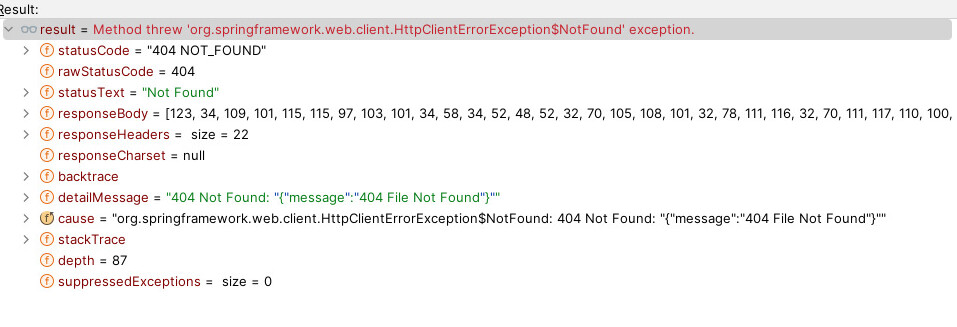
Error Response
Thanks for sharing. I asked GitLab Duo for code problems in your snippet, and then alternative approaches to the implementation. My Kotlin knowledge is very basic, so I cannot verify the code being correct/incorrect, but it sounds like reasonable approaches to try 
It returned 3 examples.
import okhttp3.OkHttpClient
import okhttp3.Request
import java.io.IOException

fun getGitLabFileWithOkHttp(): String {
    val projectId = "123456"
    val filePath = "data/data.json"
    val branch = "main"
    val token = "your_private_token"

    // Encode the file path properly
    val encodedFilePath = filePath.replace("/", "%2F")

    val client = OkHttpClient()

    val request = Request.Builder()
        .url("https://gitlab.com/api/v4/projects/$projectId/repository/files/$encodedFilePath/raw?ref=$branch")
        .addHeader("PRIVATE-TOKEN", token)
        .build()

    client.newCall(request).execute().use { response ->
        if (!response.isSuccessful) throw IOException("Unexpected response: ${response.code} - ${response.body?.string()}")
        return response.body?.string() ?: ""
    }
}
import io.ktor.client.*
import io.ktor.client.engine.cio.*
import io.ktor.client.request.*
import io.ktor.client.statement.*
import kotlinx.coroutines.runBlocking

fun getGitLabFileWithKtor(): String = runBlocking {
    val projectId = "123456"
    val filePath = "data/data.json"
    val branch = "main"
    val token = "your_private_token"

    // Encode the file path properly
    val encodedFilePath = filePath.replace("/", "%2F")

    val client = HttpClient(CIO)

    try {
        val response: HttpResponse = client.get("https://gitlab.com/api/v4/projects/$projectId/repository/files/$encodedFilePath/raw?ref=$branch") {
            headers {
                append("PRIVATE-TOKEN", token)
            }
        }

        val result = response.bodyAsText()
        client.close()
        return@runBlocking result
    } catch (e: Exception) {
        client.close()
        throw e
    }
}
import java.net.URI
import java.net.http.HttpClient
import java.net.http.HttpRequest
import java.net.http.HttpResponse

fun getGitLabFileWithJavaHttpClient(): String {
    val projectId = "123456"
    val filePath = "data/data.json"
    val branch = "main"
    val token = "your_private_token"

    // Encode the file path properly
    val encodedFilePath = filePath.replace("/", "%2F")

    val client = HttpClient.newBuilder().build()

    val request = HttpRequest.newBuilder()
        .uri(URI.create("https://gitlab.com/api/v4/projects/$projectId/repository/files/$encodedFilePath/raw?ref=$branch"))
        .header("PRIVATE-TOKEN", token)
        .GET()
        .build()

    val response = client.send(request, HttpResponse.BodyHandlers.ofString())

    if (response.statusCode() != 200) {
        throw RuntimeException("Failed to fetch file: ${response.statusCode()} - ${response.body()}")
    }

    return response.body()
}
Hey @dnsmichi, Thanks for your valuable time  .
.
I figured out the same yesterday night only.
Thank again.
1 Like