Hello,
Any one can say me if it’s normal:
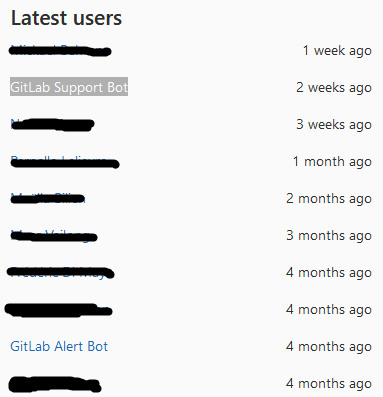
Ghost users support-bot and alert-bot (click on it do 404 error)
- Gitlab-ee core 12.4.*
- Sign up: Off
- LDAP: On
Hello,
Any one can say me if it’s normal:
Ghost users support-bot and alert-bot (click on it do 404 error)
We don’t have such users (or entries in the “Latest users” list) on our EE instance. We also currently use 12.4.2, and have Sign up disabled, but we don’t have LDAP on (our configuration management creates users via the API).
Need issue on gitlab ?
Hello, guys!
I have the same questions: how to disable this bots, if click on it redirects to 404, and why this bots use license seats?
There is no resolution yet?
As of 12.8.5-CE, the GitLab Alert Bot shows up as External, whereas the Support Bot seems to be restricted to EE.
Background: The alert-bot has recently been moved to CE:
This for “support-bot”
Come here as the initial question is familiar to mine:
I’ve duplicated the Gitlab-Server but want to use it for another Environment.
I’ve seen that those both users the Thread-opener mention are also exist at my Environment… BUT there isn’t any chance to edit them.
I wonder what for this “pseudo-Email” is used, and how to change it:
You cannot change it. The pseudo email address is generated based on the name of your Gitlab server. They aren’t used for email delivery anyway, so it can be safely ignored.
Ok, thanks a lot.
Is there any way to change it?
As I use it for another customer, I don’t like to see this “old-domain-name” there.
As already mentioned in previous post, you cannot change it. As you can see, those users cannot be edited, etc.
I believe there was a Gitlab issue open for this previously, or it was mentioned on the forums before, but there is no plan to allow anyone to change this, it is automatically filled in with the hostname and domain name of the gitlab server as used in the external_url field. As they are not used for email delivery, it has to be filled in with some value relative to the Gitlab installation. A situation that just has to accepted.
Ok, I asked again, as I think might be a way to do it via editing the database.
/etc/gitlab/gitlab.rb has another Domain-entry as shown in my those both “bot-Fields”
I’ve initially duplicated an existing cloud-instance and walked trough gitlab-ctl reconfigure.
Then I’ve edited /etc/gitlab/gitlab.rb to set external_url 'https://myDomain.com' it to a new Domainname.
Then I re-run gitlab-ctl reconfigure successfully.
But the domain of those bot-users are still on the wrong “Domain” (FQDN)
I don’t see any options in gitlab.rb that relate to configuring the bot fields, so no idea what option you are referring to. As for editing the database, I wouldn’t recommend doing that as you never know what problems you are going to cause yourself in the future. Since there is no official way to do this with Gitlab, I suggest you leave it as it as and forget about it.
I noticed it because your answer contained this:
Ok, thanks for the info. I think it’s not very well to have this “old domain” in there, but not so important.

